문제 상황
각각의 붕어빵 결과 화면에서 이미지가 커서 화면에 딱 맞게 노출이 되지 않고 있습니다. 이미지의 사이즈가 상당히 크다 보니 스클롤을 통해 하단으로 이미지를 내려야 전체 화면을 볼 수 있는 상황이었습니다.

이미지 사이즈가 커서 전체 이미지를 한 화면에서 모두 볼 수 없습니다..
캡쳐에도 불편하고, 바이럴에도 그렇게 좋지 않다고 생각해서 이미지를 클릭하면, 전체 이미지를 한 화면에서 모두 보일 수 있도록 하도록 기능을 추가하기로 했습니다.
무엇을 고려해야 할까?
- 이미지를 클릭했을 때 현재 화면의 크기를 알 수 있어야 합니다.
- 이후 전체 화면 크기에 맞추어서 이미지를 중앙에 위치시켜야 합니다.
- 이미지만 보이도록 뒤의 배경을 가릴 수 있어야 합니다.
- 스크롤이 발생하거나, 이미지 밖을 클릭하면, zoom 모드가 해제 되어야 합니다.
1. 이미지를 클릭했을 때 현재 화면의 크기를 알 수 있어야 합니다.
해당 문제를 해결하기 위해서 react의 ref를 활용했습니다. ref를 통해서 현재 window 화면 크기와 이미지 크기를 직접 통제하도록 했습니다.
해당 이미지의 클릭을 통해 이미지 확대 여부를 확인하기 위해서는 state를 활용해서 click event를 감지하도록 했습니다.
'use client';
import NextImage, { ImageProps } from 'next/image';
import { useState, useRef, useEffect } from 'react';

export default function ImageZoom(props: ImageProps) {
  const { className, ...imageProps } = props;

  const imageRef = useRef<HTMLImageElement>(null);

  const [clicked, setClicked] = useState(false);
  const [error, setError] = useState
2. 전체 화면 크기에 맞추어서 이미지를 중앙에 위치시켜야 합니다.
전체 화면 크기와 현재 이미지의 위치를 가지고 오기 위해 DOM API의 getBoundingClientRect 메서드와 window.innerWidth, window.innerHeight 를 활용했습니다. window.innerWidth, window.innerHeight 는 현재 브라우저의 전체 높이, 너비 값을 가지고 옵니다.
Element.getBoundingClientRect() 메서드는 엘리먼트의 크기와 뷰포트에 상대적인 위치 정보를 제공하는 DOMRect 객체를 반환합니다. left, top, right, bottom, x, y, width, height 프로퍼티는 전반적인 사각형의 위치와 크기를 픽셀 단위로 나타냅니다.
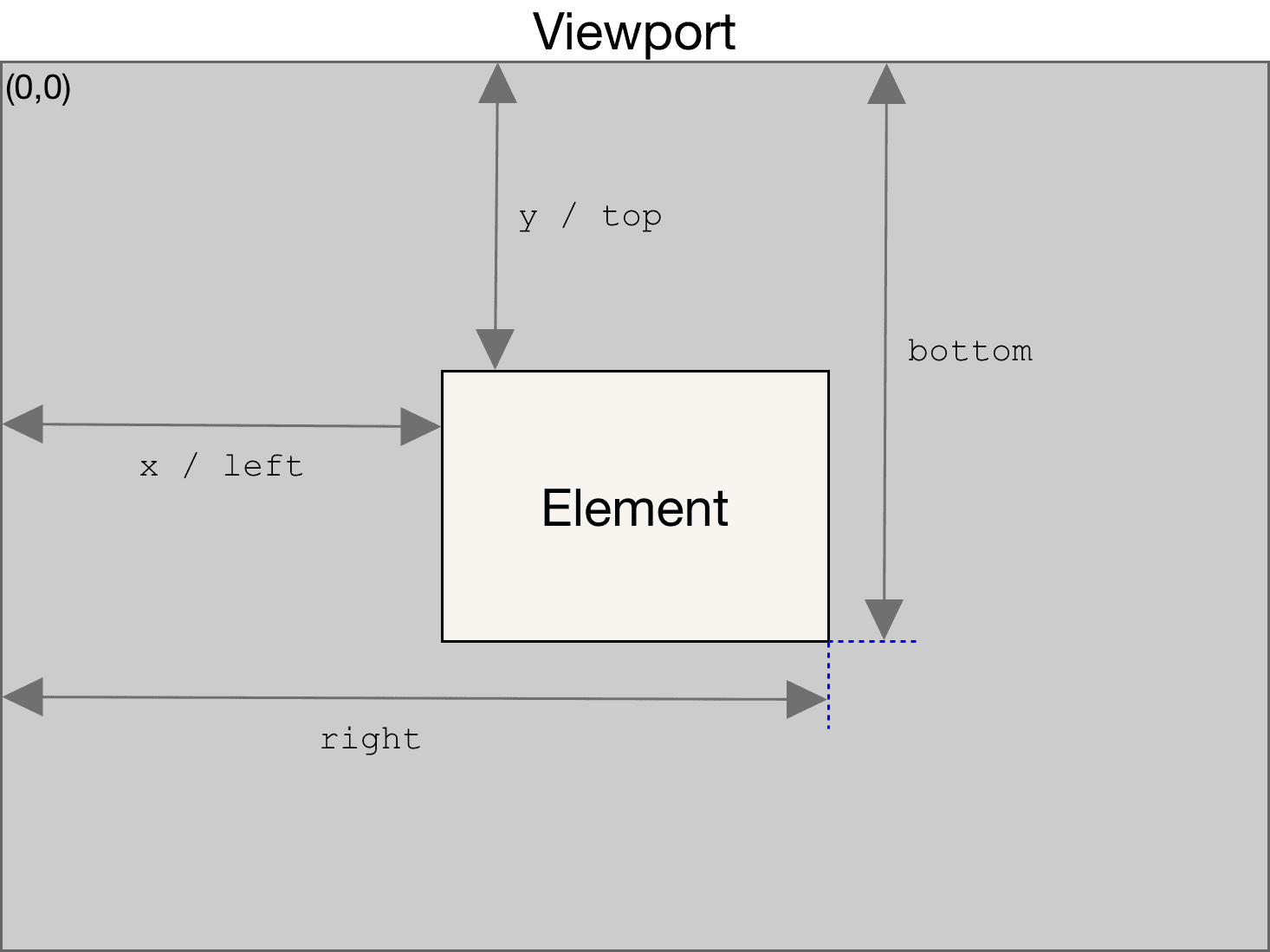
해당 값을 토대로 width와 height을 중앙에 위치하도록 합니다. 이는 전체 window width에서 현재 element의 width 값을 빼고 나누기 2를 합니다. 이를 통해 해당 남은 width의 절반 크기를 알 수 있습니다. 이후 해당 element의 상대적인 left, top 값을 빼서 해당 element를 중앙에 위치할 수 있습니다.
마직막으로 해당 이미지의 scale을 조정하기 위해서 width와 height중 큰 값을 구합니다. 이후 가장 큰 속성에 scale 작업을 위해 소수점을 곱하고 현재 element의 width 혹은 heigth으로 나눕니다.
const handleImageZoom = () => {
  if (!imageRef.current || clicked) return;

  // 현재 image의 DOMRect 값 가지고 오기
  const imageRect = imageRef.current.getBoundingClientRect();
  const clientHeight = imageRect.height;
  const clientWidth = imageRect.width;

  const wPrim = (window.innerWidth - imageRect.width) / 2;
  const hPrim = (window.innerHeight - imageRect.height) / 2;
3. 이미지만 보이도록 뒤의 배경을 가릴 수 있어야 합니다.
해당 기능을 만들기 위해서 modal뒤에 background를 까는 방법을 활용했습니다.
return (
  <>
    {clicked && (
      <div
        className="fixed left-0 top-0 z-30 h-full w-full cursor-zoom-out bg-white dark:bg-black"
        style={{ opacity: BACKGROUND_OPACITY }}
        onClick={closeWrapper}
      />
    )}
  </>
);
4. 스크롤이 발생하거나, 이미지 밖을 클릭하면, zoom 모드가 해제 되어야 합니다.
const closeWrapper = () => {
  if (!imageRef.current) return;

  imageRef.current.style.transform = `scale(1)`;

  imageRef.current.style.zIndex = '10';
  setTimeout(
    () => imageRef.current && (imageRef.current.style.zIndex = ''),
    DURATION + TIMEOUT_DELAY,
  );
  setClicked(false);
};

const handleImageZoom = () => {
  // ...
  window.document.addEventListener(
전체 코드
'use client';
import NextImage, { ImageProps } from 'next/image';
import { useState, useRef, useEffect } from 'react';

const DURATION = 300;
const TIMEOUT_DELAY = 100;
const BACKGROUND_OPACITY = 0.9;
const ZOOM_RATE = 0.7;

export default function ImageZoom(props: ImageProps) {
  const { className, ...imageProps } = props;
CONVERSATION / NOTES
읽은 뒤에 남기는 메모.
질문이나 다른 경험이 있다면 이어서 남겨주세요. 좋은 대화는 다음 글의 출발점이 됩니다.